الاسم
ST_Transform — تُعيد إسقاط رستر من نظام مرجعي مكاني معروف إلى نظام مرجعي مكاني معروف آخر باستخدام خوارزمية إعادة اعتيان محددة. الخيارات هي NearestNeighbor وBilinear وCubic وCubicSpline وLanczos، والافتراضي NearestNeighbor.
المختصر
raster ST_Transform(raster rast, integer srid, text algorithm=NearestNeighbor, double precision maxerr=0.125, double precision scalex, double precision scaley);
raster ST_Transform(raster rast, integer srid, double precision scalex, double precision scaley, text algorithm=NearestNeighbor, double precision maxerr=0.125);
raster ST_Transform(raster rast, raster alignto, text algorithm=NearestNeighbor, double precision maxerr=0.125);
الوصف
تُعيد إسقاط رستر من نظام مرجعي مكاني معروف إلى نظام مرجعي مكاني معروف آخر باستخدام خوارزمية محددة لتشويه (warping) البكسلات. تستخدم 'NearestNeighbor' إذا لم تُحدَّد خوارزمية، ونسبة خطأ قصوى قدرها 0.125 إذا لم تُحدَّد maxerr.
خيارات الخوارزمية هي: 'NearestNeighbor' و'Bilinear' و'Cubic' و'CubicSpline' و'Lanczos'. راجع: طرائق إعادة التشكيل في GDAL Warp لمزيد من التفاصيل.
كثيرًا ما يُخلط بين ST_Transform وST_SetSRID(). فالدالة ST_Transform تغيّر فعليًا إحداثيات الرستر (وتعيد اعتيان قيم البكسلات) من نظام مرجعي مكاني إلى آخر، بينما تغيّر ST_SetSRID() معرّف SRID للرستر فقط.
على خلاف الأشكال الأخرى، يتطلب الشكل 3 رسترًا مرجعيًا بوصفه alignto. سيُحوَّل الرستر الناتج إلى النظام المرجعي المكاني (SRID) للرستر المرجعي وسيُحاذى (ST_SameAlignment = TRUE) مع الرستر المرجعي.
![[ملاحظة]](../images/note.png)
|
|
|
إذا وجدت أن دعم التحويل لا يعمل كما ينبغي، فقد تحتاج إلى ضبط متغير البيئة PROJSO على مكتبة الإسقاط .so أو .dll التي يستخدمها PostGIS لديك. يكفي أن يحتوي على اسم الملف فقط. فعلى سبيل المثال في Windows، تضيف من Control Panel -> System -> Environment Variables متغير نظام باسم |
![[تنبيه]](../images/warning.png)
|
|
|
عند تحويل تغطية من البلاطات، فإنك في أغلب الأحيان تريد استخدام رستر مرجعي لضمان المحاذاة نفسها وعدم وجود فجوات بين البلاطات كما يتضح في المثال: الشكل 3. |
متاحة منذ: 2.0.0 تتطلب GDAL 1.6.1+
حُسّنت في: 2.1.0 إضافة الشكل ST_Transform(rast, alignto)
أمثلة
SELECT ST_Width(mass_stm) As w_before, ST_Width(wgs_84) As w_after,
  ST_Height(mass_stm) As h_before, ST_Height(wgs_84) As h_after
    FROM
    ( SELECT rast As mass_stm, ST_Transform(rast,4326) As wgs_84
  ,  ST_Transform(rast,4326, 'Bilinear') AS wgs_84_bilin
        FROM aerials.o_2_boston
            WHERE ST_Intersects(rast,
                ST_Transform(ST_MakeEnvelope(-71.128, 42.2392,-71.1277, 42.2397, 4326),26986) )
        LIMIT 1) As foo;

 w_before | w_after | h_before | h_after
----------+---------+----------+---------
      200 |     228 |      200 |     170
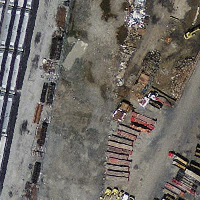 الأصل بنظام Massachusetts State Plane بالأمتار (mass_stm) |
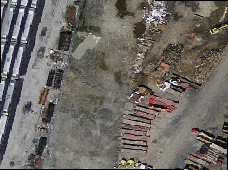 بعد التحويل إلى خطوط الطول والعرض WGS 84 (wgs_84) |
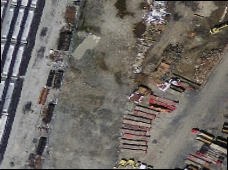 بعد التحويل إلى خطوط الطول والعرض WGS 84 باستخدام الخوارزمية الثنائية الخطية (bilinear) بدلًا من NN الافتراضية (wgs_84_bilin) |
أمثلة: الصيغة 3
يوضح ما يلي الفرق بين استخدام ST_Transform(raster, srid) وST_Transform(raster, alignto)
WITH foo AS (
    SELECT 0 AS rid, ST_AddBand(ST_MakeEmptyRaster(2, 2, -500000, 600000, 100, -100, 0, 0, 2163), 1, '16BUI', 1, 0) AS rast UNION ALL
    SELECT 1, ST_AddBand(ST_MakeEmptyRaster(2, 2, -499800, 600000, 100, -100, 0, 0, 2163), 1, '16BUI', 2, 0) AS rast UNION ALL
    SELECT 2, ST_AddBand(ST_MakeEmptyRaster(2, 2, -499600, 600000, 100, -100, 0, 0, 2163), 1, '16BUI', 3, 0) AS rast UNION ALL

    SELECT 3, ST_AddBand(ST_MakeEmptyRaster(2, 2, -500000, 599800, 100, -100, 0, 0, 2163), 1, '16BUI', 10, 0) AS rast UNION ALL
    SELECT 4, ST_AddBand(ST_MakeEmptyRaster(2, 2, -499800, 599800, 100, -100, 0, 0, 2163), 1, '16BUI', 20, 0) AS rast UNION ALL
    SELECT 5, ST_AddBand(ST_MakeEmptyRaster(2, 2, -499600, 599800, 100, -100, 0, 0, 2163), 1, '16BUI', 30, 0) AS rast UNION ALL

    SELECT 6, ST_AddBand(ST_MakeEmptyRaster(2, 2, -500000, 599600, 100, -100, 0, 0, 2163), 1, '16BUI', 100, 0) AS rast UNION ALL
    SELECT 7, ST_AddBand(ST_MakeEmptyRaster(2, 2, -499800, 599600, 100, -100, 0, 0, 2163), 1, '16BUI', 200, 0) AS rast UNION ALL
    SELECT 8, ST_AddBand(ST_MakeEmptyRaster(2, 2, -499600, 599600, 100, -100, 0, 0, 2163), 1, '16BUI', 300, 0) AS rast
), bar AS (
    SELECT
        ST_Transform(rast, 4269) AS alignto
    FROM foo
    LIMIT 1
), baz AS (
    SELECT
        rid,
        rast,
        ST_Transform(rast, 4269) AS not_aligned,
        ST_Transform(rast, alignto) AS aligned
    FROM foo
    CROSS JOIN bar
)
SELECT
    ST_SameAlignment(rast) AS rast,
    ST_SameAlignment(not_aligned) AS not_aligned,
    ST_SameAlignment(aligned) AS aligned
FROM baz

 rast | not_aligned | aligned
------+-------------+---------
 t    | f           | t

not_aligned
|

aligned
|